
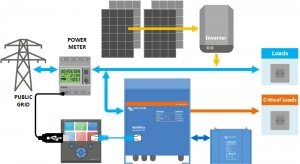
Victron Hub & LG Chem – Energy Storage Solution explained
Compatible Victron products
All 48V Multis and Quattros. And always a Colour Control GX is necessary in the system, since that has the canbus port which is used for the (required!) communication between the LG Resu battery and the Victron system.
Notes
- Derating, based on the dynamic LG Resu charge- and discharge limits:
- Minimum CCGX version is v1.36
- When configuring the system to operate in state of charge areas where derating is necessary, typically below 20%: do not connect loads to the AC-Out of the Multi: any power flowing from the battery to the AC-Out is not taken into account and will cause extra discharge current.
- The derating mechanism is not very precise yet. In other words, do not expect a discharge limit of 30A to result in a precise discharge of 30A.
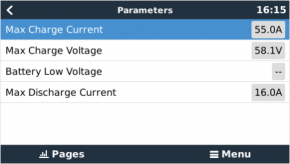
- Actual charge- and discharge limits are visible in the Parameters page. See screenshot below.
Wiring of communication cables
To use the LG Chem Resu 6.4 and Victron equipment, it is necessary to use a CCGX. It takes care of sending the necessary canbus keep-a-live message to the LG Resu. Without it, the LG Resu will open its internal circuit breaker after 10 minutes.
A special RJ-45 cable is necessary to connect the LG Resu to the CCGX. Pinout:
| Function | VE.Can RJ-45 | LG Chem RJ-45 |
|---|---|---|
| GND | Pin 3 | Pin 2 |
| CAN-L | Pin 8 | Pin 5 |
| CAN-H | Pin 7 | Pin 4 |
Place a VE.Can terminator in the empty socket on the CCGX
VEConfigure settings
| Parameter | Setting |
|---|---|
| Battery type | Lithium |
| Charge curve | Fixed |
| Absorption voltage | 56.8 V |
| Float voltage | 56.7 V |
| Absorption time | 1 Hr |
Note: make sure to double check the float voltage after completing Assistants, and if necessary set it back to 56.7 V.
Hub-4 Assistant
Select the fourth battery type:
Victron Hub and LG Chem – self-consumption
Then:
- Enter the battery capacity:
- Resu 6.4 – 126 Ah
- Resu 6.4 + 1 pcs EX 3.2 – 189 Ah
- Resu 6.4 + 2 pcs EX 3.2 – 252 Ah
- Do not change the dynamic cut-off values, they have already been set correctly after selecting the lithium battery type.
- Same for the restart offset
- Configure the system to Stop discharging on low SOC, and set it to 20%. Setting it lower will result in a recharge up to around this percentage immediately after stopping the discharge, which is caused by the Sustain mechanism. There will soon be an update of Hub-4 available that prevents this and makes the full capacity of the battery available.
Color Control GX Configuration
- Enable the LG Battery Service in the CCGX. Menu path: Settings → Services → CAN-bus BMS. Note that this changes the function of a VE.Can port: it is not possible to connect both VE. Can products and an LG battery together.
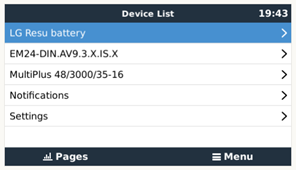
- After properly wiring and setting up, the LG Resu will be visible as a battery in the device list:
- The parameters option within the battery page shows the actual battery charge and discharge limits:

- Make sure to enable the Synchronize VE.Bus SOC with battery setting in the System Setup page in the CCGX: it will copy the State of Charge as reported by the LG Resu to the Multi or Quattro, making Hub-4 work with that SOC.
What to do if the LG circuit breaker has tripped?
Starting from version v1.40, the CCGX will detect a tripped LG circuit breaker. If this happens an error will be shown on the display (‘Circuit breaker tripped’), both LEDs on the LG resu battery will be off, and the Multis/Quattros will be switched off.
Why would the circuit breaker trip? The only circumstance, apart from faults and broken products, in which the circuit breaker could trip is during a mains failure. During the mains failure the Multis/Quattros will power the AC Loads connected to their output (UPS Loads in above system schematic). And will no longer maintain the discharge current within normal limits, as there is no way for the inverter to reduce the discharge current. Other than completely shutting down of course.
To get the system running again:
- Ensure on the CCGX that the Multis/Quattros connected to the battery are switched off.
- Remove the top cover of the battery. The circuit breaker switch should be located between the ON and OFF positions.
- Move the circuit breaker to the OFF position
- Move the circuit breaker back to the ON position. If the breaker moves away from the ON position automatically, try again a few seconds later (first to the OFF position then to ON again). If this behavior persists, there may be a battery malfunction.

 5. Restore the battery top cover again
6. Switch the Multis/Quattros on in the CCGX menu. Normal operation should continue after the system has initialized.
Information supplied by VictronEnergy Live
